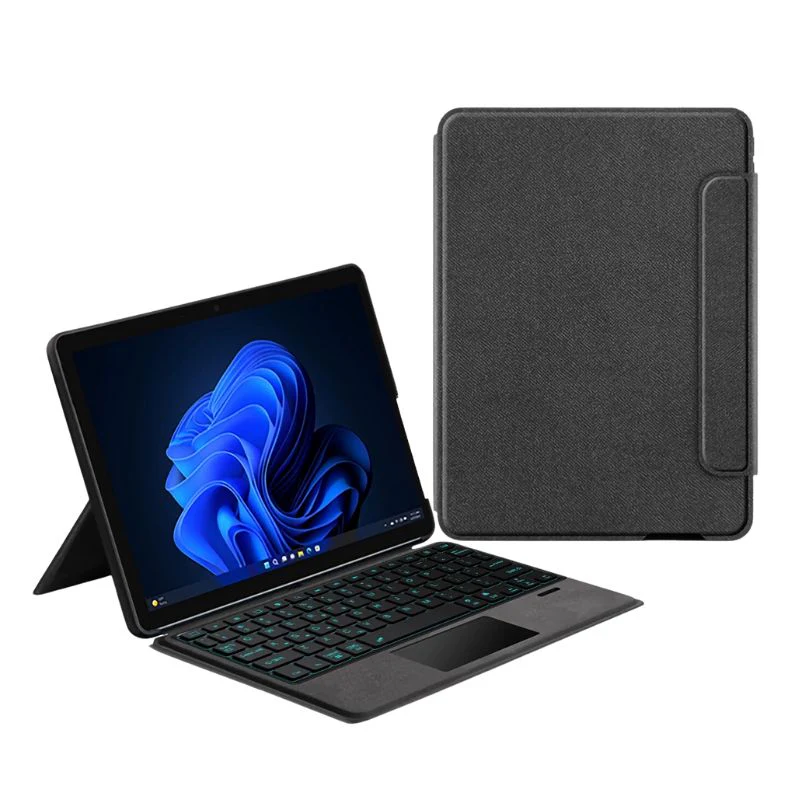
[With Backlight] Microsoft Surface Go 1/2/3/4 - PU Leather Flip Cover Smart Bluetooth Touch Keyboard Case
Keyboard Layout: US
Compatible With:
- Microsoft Surface Go 1 (1824 & 1825)
- Microsoft Surface Go 2 (1901 & 1926 & 1927)
- Microsoft Surface Go 3 (1901 & 1926 & 1927)
- Microsoft Surface Go 4
Product Features:
-
Drop protection.
-
Smart touch panel.
-
Auto Sleep/ Wake feature.
-
Multi-Angle Adjustment.
-
Raised edges around the screen and camera.
Description:
With a smart touch panel and multi-angle adjustment, you can easily customize your tablet experience to your preferences. The auto sleep/wake feature conserves battery life, making this case a practical and stylish choice for your tablet. Raised edges around the screen and camera provide additional protection, ensuring your device stays safe and secure at all times.
🔹 Connection Steps (Bluetooth Pairing)
-
Turn on the keyboard
-
Slide the power switch on the side of the keyboard to the "ON" position.
-
Enter pairing mode
-
Press and hold the Bluetooth "🔗" key (located on F12) for about 3–5 seconds until the LED indicator flashes rapidly (indicating it is in pairing mode).
-
Pair with your device
-
Go to:
Settings → Devices → Bluetooth & Other Devices → Add Bluetooth Device → Select your keyboard (e.g., "Bluetooth Keyboard").
-
Complete the connection
-
Once paired successfully, the LED indicator will either stay solid or turn off.
🔹 RGB Backlight Toggle
-
Please first confirm whether your keyboard supports backlight.
-
Switch the RGB backlight:
-
Press the dedicated RGB key.
Keyboard Layout: US
Compatible With:
- Microsoft Surface Go 1 (1824 & 1825)
- Microsoft Surface Go 2 (1901 & 1926 & 1927)
- Microsoft Surface Go 3 (1901 & 1926 & 1927)
- Microsoft Surface Go 4
Product Features:
-
Drop protection.
-
Smart touch panel.
-
Auto Sleep/ Wake feature.
-
Multi-Angle Adjustment.
-
Raised edges around the screen and camera.
Description:
With a smart touch panel and multi-angle adjustment, you can easily customize your tablet experience to your preferences. The auto sleep/wake feature conserves battery life, making this case a practical and stylish choice for your tablet. Raised edges around the screen and camera provide additional protection, ensuring your device stays safe and secure at all times.
🔹 Connection Steps (Bluetooth Pairing)
-
Turn on the keyboard
-
Slide the power switch on the side of the keyboard to the "ON" position.
-
Enter pairing mode
-
Press and hold the Bluetooth "🔗" key (located on F12) for about 3–5 seconds until the LED indicator flashes rapidly (indicating it is in pairing mode).
-
Pair with your device
-
Go to:
Settings → Devices → Bluetooth & Other Devices → Add Bluetooth Device → Select your keyboard (e.g., "Bluetooth Keyboard").
-
Complete the connection
-
Once paired successfully, the LED indicator will either stay solid or turn off.
🔹 RGB Backlight Toggle
-
Please first confirm whether your keyboard supports backlight.
-
Switch the RGB backlight:
-
Press the dedicated RGB key.
Description
Keyboard Layout: US
Compatible With:
- Microsoft Surface Go 1 (1824 & 1825)
- Microsoft Surface Go 2 (1901 & 1926 & 1927)
- Microsoft Surface Go 3 (1901 & 1926 & 1927)
- Microsoft Surface Go 4
Product Features:
-
Drop protection.
-
Smart touch panel.
-
Auto Sleep/ Wake feature.
-
Multi-Angle Adjustment.
-
Raised edges around the screen and camera.
Description:
With a smart touch panel and multi-angle adjustment, you can easily customize your tablet experience to your preferences. The auto sleep/wake feature conserves battery life, making this case a practical and stylish choice for your tablet. Raised edges around the screen and camera provide additional protection, ensuring your device stays safe and secure at all times.
🔹 Connection Steps (Bluetooth Pairing)
-
Turn on the keyboard
-
Slide the power switch on the side of the keyboard to the "ON" position.
-
Enter pairing mode
-
Press and hold the Bluetooth "🔗" key (located on F12) for about 3–5 seconds until the LED indicator flashes rapidly (indicating it is in pairing mode).
-
Pair with your device
-
Go to:
Settings → Devices → Bluetooth & Other Devices → Add Bluetooth Device → Select your keyboard (e.g., "Bluetooth Keyboard").
-
Complete the connection
-
Once paired successfully, the LED indicator will either stay solid or turn off.
🔹 RGB Backlight Toggle
-
Please first confirm whether your keyboard supports backlight.
-
Switch the RGB backlight:
-
Press the dedicated RGB key.